 By Thomas Laic

Google Flights is a useful starting point when you know your destination and want to compare departure dates, journey times and booking options. Skyscanner is especially worth trying when your destination is still open and you want to explore where your budget could take you.
Both services support flexible travel. Start with the question you still need to answer: where to go, when to fly or which offer to book. Then compare matching itineraries and check the final price with the booking provider.
Google Flights and Skyscanner at a glance
| Your planning task | Google Flights | Skyscanner |
|---|---|---|
| Compare dates for a chosen destination | Interactive calendar and price graph | Flexible Dates calendar or grid |
| Look for a destination | Destination map and suggested destinations | Explore everywhere |
| Narrow down an itinerary | Filters including stops, airlines and times | Filters including stops and departure times |
| Follow a route over time | Price tracking for specific dates or Any dates | Email price alerts for a route and specific dates |
| Complete the booking | Usually redirects to an airline or online travel agency | Shows airline and agency options for booking with the provider |
Google describes its calendar, price graph, map and filters in its flight search guide. Skyscanner explains Explore everywhere and Flexible Dates in its search help, and alerts in its pricing help.
When to start with Google Flights
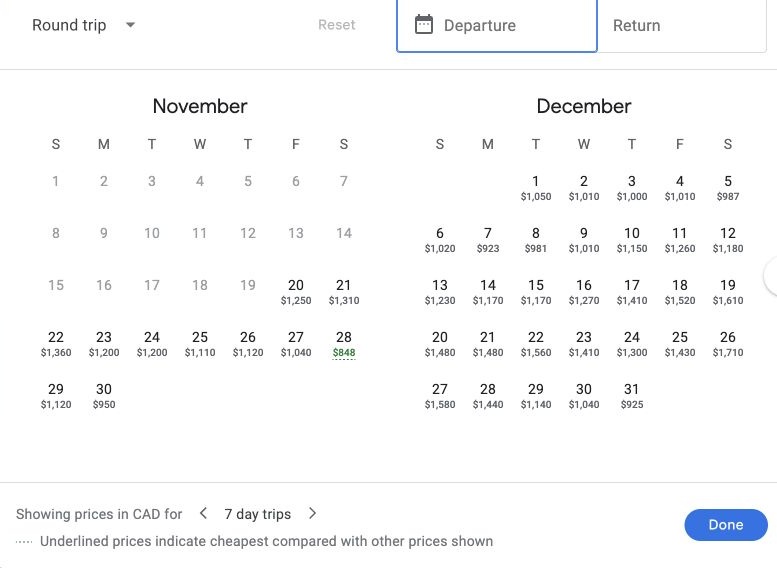
Start with Google Flights if the destination is fixed but your travel days are negotiable. Its calendar and price graph let you examine different dates before comparing the details of individual flights.
For a weeklong trip, decide how much flexibility you actually have. Leaving a day earlier may be possible; returning three days later may not be. Compare date combinations that fit your available time, then look at departure times and total journey duration.
A lower fare can become a more expensive trip if it adds accommodation or requires a costly airport transfer. Treat the calendar as the beginning of the decision, then calculate the consequences of changing dates.
If you are still deciding when to book, Google supports tracking for a route or a particular flight. Its Any dates option can also monitor a route when your dates are flexible. See Google’s price tracking instructions.
When to start with Skyscanner
Start with Skyscanner’s Explore everywhere feature if your question is closer to “Where could I go?” than “Which flight should I buy?”
Shortlist destinations that fit the kind of break you want. Then assess the whole trip: accommodation, transport from the airport and the amount of usable time at the destination. An appealing airfare alone does not tell you whether a weekend away will fit your budget.
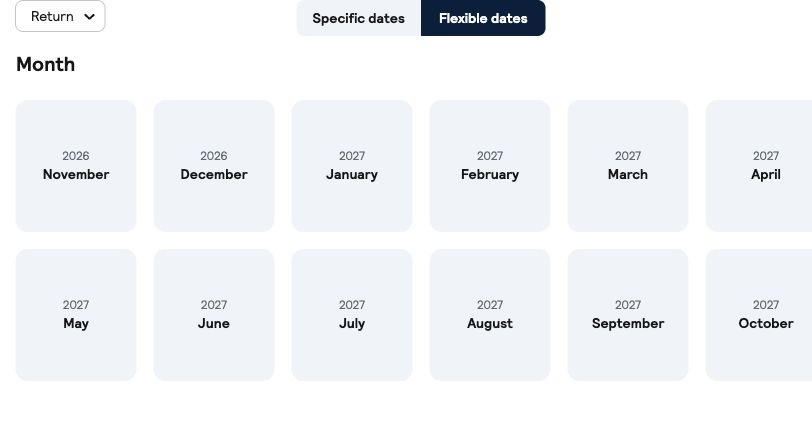
Once you choose a destination, use Flexible Dates to explore the month. Skyscanner explains that these calendar prices are indicative and based on recent searches. Selecting a date starts the check for current flight options, so the calendar amount is not a guaranteed booking price. Skyscanner Flexible Dates guidance
For a chosen route and dates, Skyscanner also offers email price alerts. Its alerts retain passenger count and a direct-flight preference, but do not apply additional filters such as flight times or duration. Recheck those details when an alert arrives. Skyscanner alert guidance
How to compare the two fairly
The most useful comparison is the same trip on both services. Before deciding that one has a better offer, match these details:
- Airports: compare the exact airports, not just the city names.
- Dates and passengers: keep the travel dates, passenger count and cabin identical.
- Journey: check the flight times, connections and total duration.
- Fare conditions: compare the baggage allowance and change or refund terms.
- Booking provider: identify the airline or agency selling each offer.
If one result is still cheaper, open the provider’s offer and check that those details remain the same. Google notes that additional charges can apply and prices can differ after selection. Skyscanner also cautions that its indicative calendar prices can change. Google pricing guidance, Skyscanner calendar guidance
Comparing the final price
Neither can be declared cheaper for every trip. A useful result depends on the route, date, available fare and provider, as well as what the traveler needs included.
Compare the flight you would actually take. A lower displayed amount is less useful if it buys a different airport, an unsuitable connection or a fare without the baggage you need.
Google also explains that it does not include every airline or available flight. Checking another search service and the airline’s own offer can therefore be worthwhile before booking. Google’s explanation of flight coverage
Who manages your booking
Finding a flight and selling a ticket are separate steps. Google Flights usually sends you to an airline or online travel agency. Skyscanner likewise shows providers with whom you can complete the booking. The provider and fare you select determine the booking conditions. Google booking guidance, Skyscanner search guidance
Before paying, establish who will manage a change and where the fare rules are displayed. This matters especially when a cheaper offer comes from a different agency rather than a different flight.
A practical search order
For a fixed destination, begin with Google Flights to compare workable dates and journeys. Check the same trip on Skyscanner, then assess the final offers from the providers you would consider using.
For an open destination, begin with Skyscanner’s Explore everywhere, shortlist a few places and compare realistic travel dates. Use Google Flights to examine the shortlist in more detail.
Choose the offer that fits your trip after checking its total cost and conditions. The search service is a way to find that offer; it does not need to be the same one every time.
Related comparisons
- KAYAK vs Skyscanner for Choosing a Flight Booking
- Momondo vs Google Flights for Comparing Flight Costs
Featured photograph: Wikimedia Commons, CC0 1.0. Resized for web use.